Start with the product.
Identify the audience, first-screen task and content before choosing a layout. Turn a vague style request into decisions about hierarchy, typography, color and imagery.
 Oil UI
Start with the product. Compare distinct directions. Refine the interface against the screen you actually built.
For developers and creators designing websites, apps, dashboards or components with an AI coding assistant.
Identify the audience, first-screen task and content before choosing a layout. Turn a vague style request into decisions about hierarchy, typography, color and imagery.
The free 0.18.0 workflow offers style cards, then layout alternatives. Keep the content consistent so a design decision has something real to compare.
Use rendered screenshots to inspect clipping, reading order and visual hierarchy. Interface review and screenshot recreation are also covered.
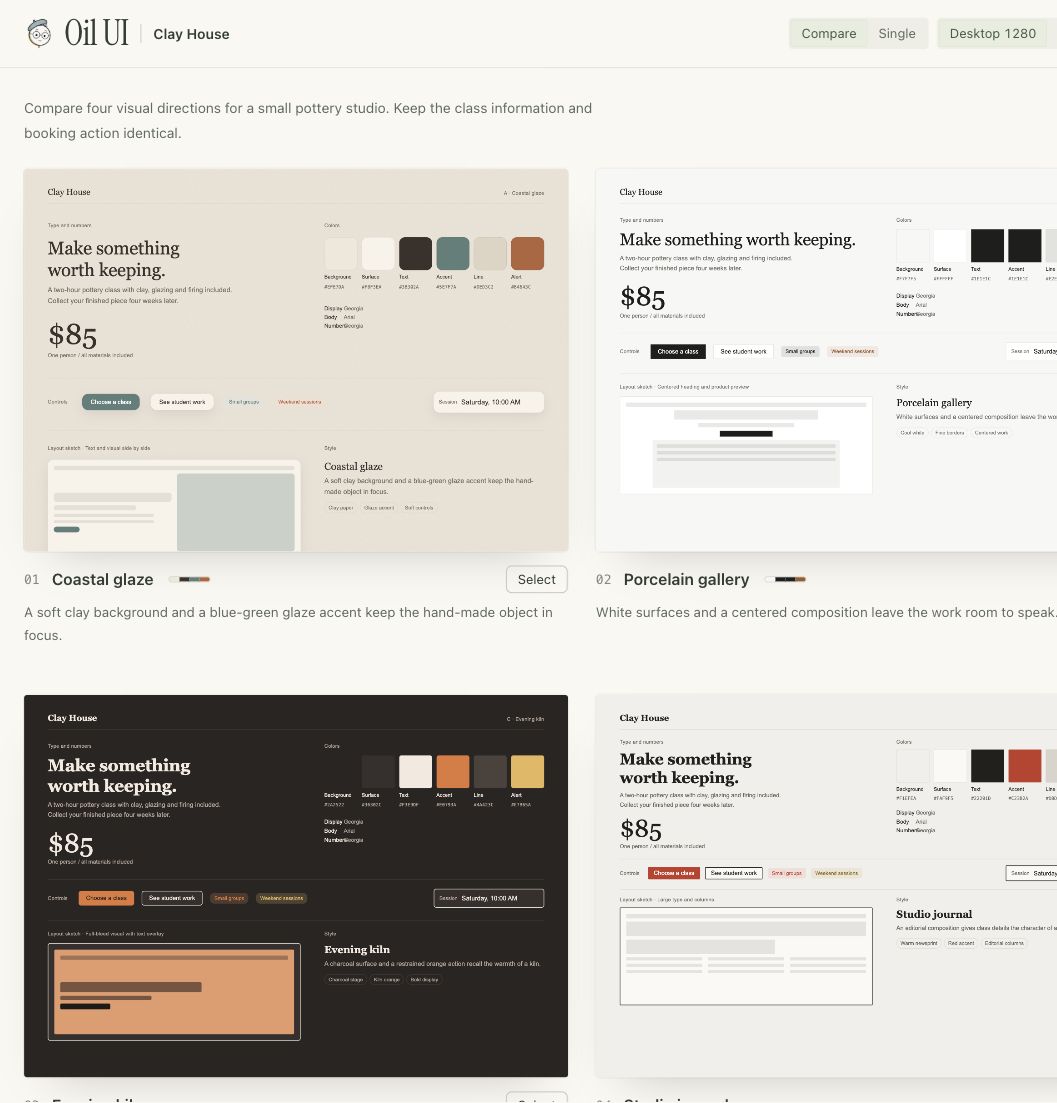
One pottery-class brief, four style directions and a portable comparison page. These are screenshots of a generator run made for this adaptation, rather than borrowed Pro work.
Use the Download button on the Finch listing, unzip the package, and place its oil-ui directory in your assistant’s supported Skill location. Confirm the assistant can read SKILL.md.
This edition documents the source currently delivered by Finch: Oil UI 0.18.0, market version 1. It does not advertise the merchant’s newer 0.23.8 tools as included.
A coding assistant that can read files and implement the requested design. Optional comparison tools use Python 3.10+. Screenshot tooling uses Node.js 22+ and a supported Chrome-family browser; recording also uses ffmpeg. Actual visual review requires image-viewing capability.
No additional API key is required by the core local workflow. Access to an AI model and any optional paid media service is separate and can incur charges.
This Skill guides design judgment. It does not provide a backend, a hosted design service, a model subscription, or Oil UI Pro. Pure business logic, API work and code cleanup without UI changes are outside its scope.
Optional update checks read public release metadata and cache the result locally. They do not update the package without a user request. Set OIL_NO_UPDATE_CHECK=1 to skip them.
The 38-file download was checked against the existing source checkout, with no file differences. The primary Markdown hash matches the current Finch record. A real four-card generation and browser preview were checked; no broad model benchmark or client-project outcome is claimed.
Original source at 7987bb38afeea1ff8e96641b3ffebb5601fe67d2
MIT copyright and upstream attribution are retained. Instrument Serif is separately covered by SIL OFL 1.1; bundled library notices remain in the source package.